



How to Trigger CSS3 Transitions on Click using :target
 If you’ve seen any of my previous posts, you’ll probably know that I’ve been doing a lot of playing around and experimenting with CSS3, including transitions which I’m a huge fan of. This post will be furthering the experimentation and looking into more creative ways in which transitions could be used and hopefully providing some ideas for more practical usage of the property.
In particular, we’re going to explore a way in which we can trigger a transition by clicking on an unrelated element on the page; something which cannot be done without JavaScript according to a few things I’ve read on the web. Well we’re going to prove that to be false and look at a way it can be done, using barely a few lines of simple CSS.
A quick note
Before we go any further, don’t confuse triggering transitions on click with triggering them when in the :focus state. Yes, if your element has properties defined on :focus, then the transition will trigger when the element is clicked, but only when that element is clicked, and it will also revert to its original state when you release the click.
What we’ll be doing is triggering the transition by clicking on a completely different page element causing the transitioned elements new state to remain in that new state for the forseeable, whether you release your mouse button or not.
The :target Pseudo-selector
So what’s this :target thing all about? :target is a pseudo-selector, just like :hover and :visited, but it’s not so widely known or used because, well, there’s not much need for it in your average project.
What does it do?
You know sometimes when rather than link to another page, you link to an element in the same page? Well that’s where :target comes into play.
Let’s use this markup as an example;
<a href="#one">One</a>

<p id="one">This is number one.</p>
<p id="two">This is number two.</p>
You probably know that when the link is clicked, it will add #one onto the end of the URL in your address bar. You can use :target to, errrm, target the specific element that has been, errrm, targeted! For example:
p {
    color:black;
}

p:target {
    color:red;
}
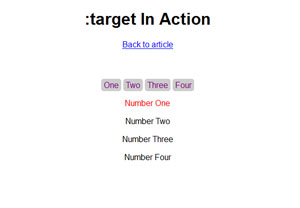
The above CSS would ensure that the paragraph that has been targeted will change colour from black to red, whereas the other paragraph in our example will simply remain black. Take a look at this in action…

So far, so simple.
Enter, CSS3 Transitions
If you’ve used CSS3 transitions before, then the rest will be fairly obvious – if not, read on to see how we can make :target a little more impressive.
We’ve done the bulk of the work already – which considering how little we’ve had to do so far shows just how easy transitions are to use and to enhance our projects. All we need to do is add one solitary line of CSS3 (in theory that is; in reality we need to add a few what with all the vendor pre-fixes we need to use!)…
p {
    color:black;
    transition:all 1s ease;
}
How easy was that! If you’re a bit confused by what’s just happened, you might want to read my posts on CSS3 transitions which should explain all you need to know.
I’ve put together another quick demo, demonstrating an extremely simple example of using CSS3 transitions with the :target pseudo-selector. First of all, here’s what we’ve done…
The Markup
<a href="#one">One</a>
<a href="#two">Two</a>
<a href="#three">Three</a>
<a href="#four">Four</a>

<p id="one">Number One</p>
<p id="two">Number Two</p>
<p id="three">Number Three</p>
<p id="four">Number Four</p>
The CSS
p {
    transition:all 1s ease;
    /* Don't forget the vendor specific pre-fixes! */
}

p:target {
    color:red;
    font-size:40px
}
The Outcome
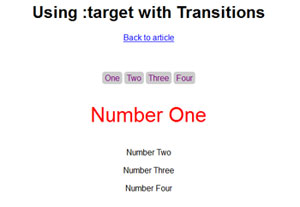
How simple was that?! 8 lines of markup and 7 lines of CSS. Check out the demo…
If you’ve put this technique to use or if you’ve got some creative ideas that your planning to carry out then I’d love to hear about them in the comments section.
About Stephen Greig

Stephen Greig is a 25 year old Freelance Web Designer/Front-end guy, currently living in Nottingham, UK. Stephen is also the creator of messivsronaldo.net and author of CSS3 Pushing the Limits, a book on advanced CSS3. You should follow him on Twitter where he talks about the web, sports, music and swears a lot. Stephen's also on Google+ if that's more your bag.
